Client Onboarding Checklist: 8 Steps for Freelancers and Remote Teams
Table of content
- 1. Signed Service Agreement or Statement of Work
- 2. Client Intake Questionnaire and Discovery Brief
- Keep the form lean enough to finish
- 3. Deposit, Invoicing, and Payment Setup
- 4. Tax and Compliance Documentation Collection
- Treat compliance as a setup step, not a rescue mission
- 5. Time Zone, Availability, and Communication Preferences
- 6. Project Kickoff, Scope Confirmation, and Milestone Timeline
- 7. Access, Tools, and Data Security Setup
- Separate workspace, separate client
- 8. Welcome Communication and Ongoing Reporting Cadence
- 8-Point Client Onboarding Checklist Comparison
- Turn the Checklist Into a Repeatable Onboarding System
Most client projects go sideways before the first task, not after it. The warning signs are usually small at first, a vague request, a scope that nobody has signed, a payment that's “on the way,” or a kickoff call scheduled before the client has even confirmed who can approve what. If you work across borders, the mess gets bigger fast, because tax forms, currencies, time zones, and access rules all show up at once.
A client onboarding checklist should do one job well, move a relationship from interest to first value without guesswork. A good checklist does that in a short sequence of visible milestones, not a giant intake dump that exhausts everyone before work starts. It also accounts for realities generic guides skip, especially when the client is in another country, pays in a different currency, or expects asynchronous communication across time zones.
1. Signed Service Agreement or Statement of Work
A project can look ready from the first email and still stall if the paperwork is loose. I do not start work until the agreement is signed, because that is where deliverables, revision limits, payment terms, confidentiality, ownership, and termination terms get fixed in writing.
Cross-border work needs a little more care. The contract should name the governing law and working jurisdiction clearly, because a solo developer billing a U.S. startup from abroad faces different expectations than a local client. Revision counts need the same clarity, since “a few edits” means something different to every buyer.
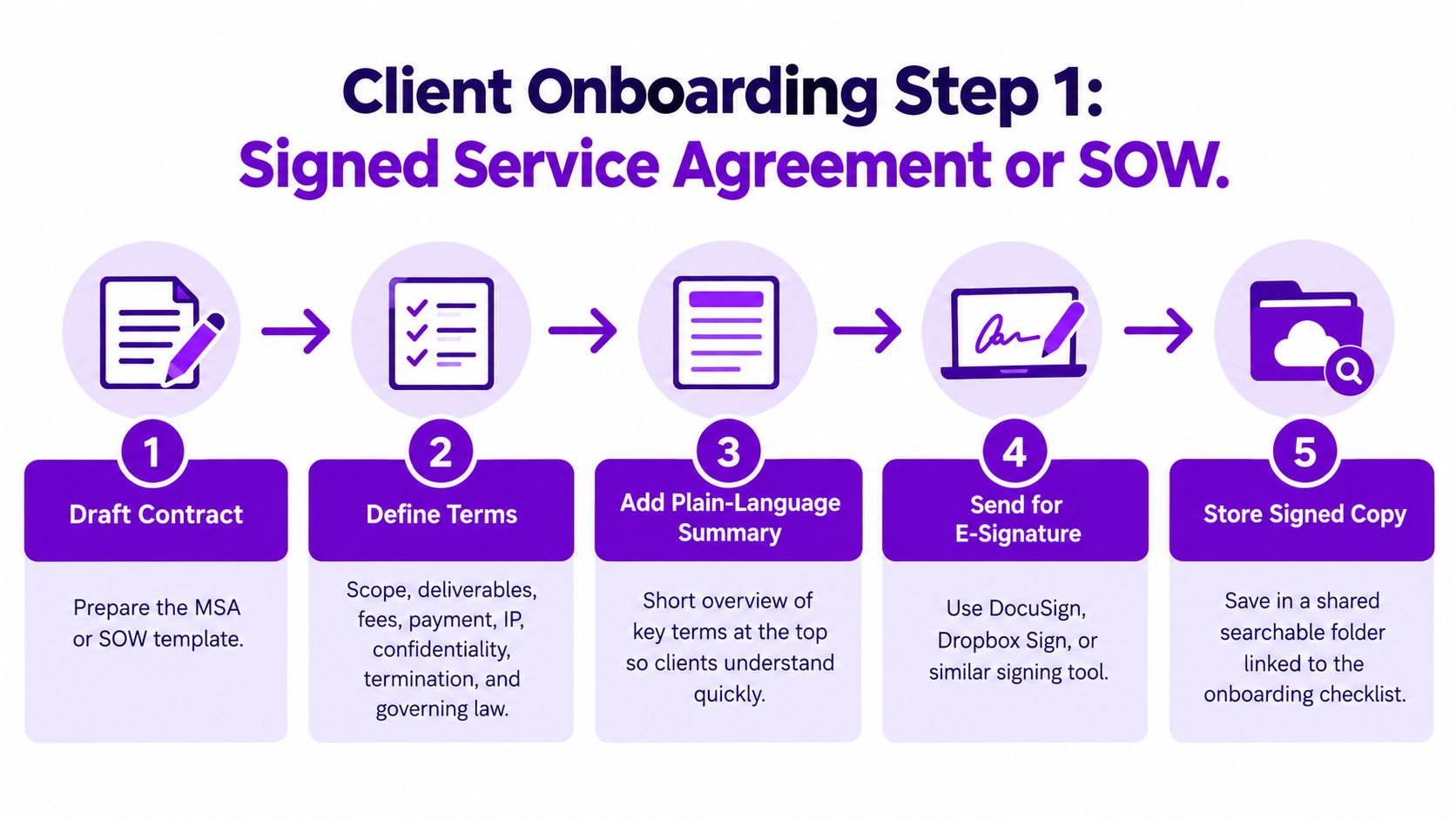
Practical rule: put a plain-language summary at the top of the agreement. Clients read that first, which cuts down on later arguments about what was included.
For international projects, I also save the signed PDF in a shared folder and link it inside the onboarding checklist so there is one source of truth. Before you send your own agreement, review a seller's guide to service agreements so your terms hold up in a cross-border context.
A remote UX designer can keep this simple. A three-page SOW with two design rounds, a 50% deposit, and a 14-day payment term gives the client enough structure to move quickly while still protecting the designer when feedback starts multiplying.
For a useful parallel on location-independent work, see Mazurly's guide to the Costa Rica digital nomad visa.
2. Client Intake Questionnaire and Discovery Brief
The intake form is where vague intent becomes usable information. If the client says they want “more visibility,” that's not a brief, it's a starting point for questions about audience, goals, constraints, and what success means. The strongest briefs are short, focused, and written before the kickoff call so the call can stay strategic instead of wandering.
A good version usually asks for goals, background, target audience, existing assets, stakeholders, and examples of what the client does not want. That last one matters more than people expect. A marketing freelancer who asks for both “what do you want?” and “what should this avoid?” usually gets cleaner direction than someone who only collects wish lists.
Keep the form lean enough to finish
Too many questions kill momentum. The strongest forms are narrow enough to complete in one sitting, then followed by a live conversation that clarifies priorities and trade-offs. A growth consultant working with an online course business might use the brief to establish baseline metrics before any campaign work starts, then summarize the answers back in writing so the client can confirm the direction.
The best intake brief doesn't gather every possible detail. It gathers the few details that stop the project from starting in the wrong direction.
For cross-border clients, I'd also ask about language preferences, who gives final approval, and whether the team wants async feedback in writing or a live discussion. That small addition saves a lot of back-and-forth later, especially when people are split across continents. The checklist shouldn't feel like a bureaucracy test. It should feel like the fastest route to a useful first draft.
3. Deposit, Invoicing, and Payment Setup
Payment setup should happen early enough that the client treats it as part of onboarding, not as an administrative afterthought. If the deposit is unclear, invoicing is vague, or the billing contact hasn't been named, cash flow gets slower for no good reason. For freelancers and consultants, that delay can create more pressure than the project itself.
The cleanest setup is simple. State the deposit amount, invoice schedule, payment method, currency, due dates, and billing details in one place. Then repeat the essentials on every invoice so the client doesn't have to scroll through old email threads to pay you. If you work internationally, confirm the client's exact legal name and billing address before sending the first invoice, because a wrong entity name can turn a routine payment into a support ticket.
A remote developer working with European clients, for example, might choose a EUR billing setup to reduce conversion headaches. A copywriter may prefer a deposit link and milestone invoices tied to draft approvals, which keeps payment aligned with visible progress instead of a vague final handoff. That's usually better than waiting until the end and hoping accounts payable moves quickly.
Practical rule: if the first invoice is wrong, every later invoice gets harder. Fix the billing details before the first send.
For consistency, use Mazurly's guide to pricing freelance services as a reference point when you're setting the commercial side of the relationship. And if you want a repeatable billing workflow from the start, keep your records consistent with a shared invoicing process rather than improvising each time. That's especially useful when you're juggling multiple currencies and clients in different time zones.
4. Tax and Compliance Documentation Collection
Tax paperwork is not glamorous, but it's one of the fastest ways to avoid payment friction. The right documents depend on the client's country, your tax residency, and the client's own compliance rules. A freelancer based in Portugal working for a U.S. client, for instance, may need to provide a W-8BEN before the first payment. A U.S.-based contractor onboarding with a large domestic client may be asked for a W-9 instead.
The key is to ask about vendor requirements on the first call, not after the work is already underway. Some clients need tax forms, business registration details, or procurement approvals before they can release payment, and nobody enjoys discovering that on day ten. Keep current copies of your tax forms, business documents, and tax IDs in a secure folder so you can respond quickly when someone asks.
Treat compliance as a setup step, not a rescue mission
If you move countries, the paperwork can change. If you work with VAT or GST obligations, the invoicing rules can change too. That's why general guidance isn't enough on its own, and why you should confirm the details with a qualified tax professional before relying on any blanket advice, especially around residency.
For remote professionals who split their life across countries, Mazurly's guide to investing while living abroad is a useful reminder that cross-border money decisions rarely stay in one lane. The same mindset applies here. A clean tax setup protects payment timing, keeps the client's finance team happy, and lowers the chance that onboarding gets stuck because one form was missing.
5. Time Zone, Availability, and Communication Preferences
A client in New York, a freelancer in Bali, and a marketing lead in Lisbon can all be responsive and still miss each other for days if the communication rules are vague. I set overlap windows, response-time expectations, preferred channels, and escalation paths before work starts, because “we'll just coordinate in chat” breaks down fast across time zones.
Write this step into the onboarding doc so it survives beyond the kickoff call. If you answer messages only during local business hours, say so plainly. If after-hours emergencies are allowed, define what counts as an emergency and whether that time is billable. Clients usually accept boundaries. They react badly to surprises.
The details matter more on distributed projects. A project manager in Bali may agree to a morning overlap with a U.S. client and handle the rest asynchronously. A global marketing team may keep a shared response-time table so everyone knows what “urgent” means in practice. The wider the spread of time zones, the more useful it is to make the rules boring and explicit.
Set the time zone rule once, then stop renegotiating it in chat.
For scheduling, use Mazurly's Free Time Converter or any equivalent time-zone tool to line up meeting options in both regions before you send the invite. A weekly availability calendar with focus blocks also helps, because clients can see when you are free. That simple visibility cuts down on back-and-forth and prevents avoidable friction later.
6. Project Kickoff, Scope Confirmation, and Milestone Timeline
The kickoff meeting should turn the brief into an executable plan. By the end of it, everyone should know the deliverables, the approval path, the milestone dates, and what happens if something slips. If the call ends with “we'll keep in touch,” the project is still soft around the edges.
Send the agenda and a draft timeline at least 24 hours in advance. That gives the client time to spot missing dependencies, schedule conflicts, or approvals that need to happen internally. Then use the call to confirm the scope in plain language and make the handoff from discovery to delivery as narrow as possible.

A content strategist might run a 45-minute kickoff and leave with five milestones, each tied to an approval date. A startup team might keep the plan in Notion or Asana so every change lands in one source of truth. That matters because email threads and chat messages quickly turn into competing versions of the same scope.
If a milestone slips, the schedule should be re-baselined immediately, not “caught up later.” The timeline only works if someone owns the change.
Record the call only with permission, then send the notes within one business day. That way the client can correct misunderstandings while the conversation is still fresh. The first milestone should be specific enough to prove progress, not just “work has started.” That's how you move a project from optimism to actual momentum.
7. Access, Tools, and Data Security Setup
Access should be granted like a ladder, not a floodgate. Give the client or contractor only the permissions needed for the next step, then expand access as the work requires it. That keeps systems cleaner and makes revocation easier when the project ends.
Shared credentials belong in a password manager, not in a loose email chain. A freelance web developer who receives staging-server credentials through a shared vault can also have access removed on the final invoice date, which is much cleaner than remembering to chase every login later. For any shared account, turn on two-factor authentication and keep a written access log that shows what was granted and when it was revoked.
A consultant handling customer data for a churn analysis should sign a mutual NDA before receiving anything sensitive. That's not paranoia, it's standard professional hygiene. It also helps separate “I need access to do the work” from “I need extra data because it might be useful,” which is where too many projects get sloppy.
Separate workspace, separate client
Use separate folders or workspaces for each client so files don't bleed together. The more regulated or privacy-sensitive the project, the more important it is to specify why each item is being requested, who receives it, and how long it stays available. That's especially relevant for remote professionals working across jurisdictions, where secure and reversible access is often more practical than broad, permanent permissions.
The trade-off here is speed versus control. Fast access feels efficient on day one, but least-privilege access and written revocation rules save time when the project changes or ends. A good checklist makes that trade-off visible instead of pretending it doesn't exist.
8. Welcome Communication and Ongoing Reporting Cadence
The welcome message sets the tone for the whole relationship. It should tell the client what happens next, where updates will live, how often they'll hear from you, and what kind of feedback you want at each stage. If you don't define the cadence, clients fill the silence with questions.
The best reporting rhythms are simple and repetitive. A Friday update with three metrics, two wins, and one decision needed from the client works because it gives them a predictable place to look for status. A client portal with timeline notifications can also reduce noise, especially when multiple stakeholders need visibility without a long email chain.
A digital marketing consultant can keep calls short by sending a concise weekly note that links progress to business outcomes, not just tasks completed. That's the difference between “we posted three assets” and “this work moved the campaign forward in a way the client can use.” You don't need a long report if a short one answers the key questions.
Make the cadence boring on purpose. Predictable updates create fewer surprises than impressive but irregular communication.
You should also ask the client how often they want updates during onboarding, then document that answer. Some clients want weekly check-ins, others prefer a biweekly call and asynchronous summaries in between. Either way, the pattern should begin during onboarding, not after the first problem appears. A short welcome sequence, a first-week check-in, and a first-milestone review give both sides a rhythm that's easy to maintain.
8-Point Client Onboarding Checklist Comparison
| Onboarding Item | 🔄 Implementation Complexity | ⚡ Resource Requirements | 📊 Expected Outcomes | ⭐ Key Advantages | 💡 Ideal Use Cases |
|---|---|---|---|---|---|
| Signed Service Agreement or Statement of Work | Medium; draft, review, and obtain signatures | Contract template, e-signature tool; possible legal review | Clear scope, payment terms, and responsibilities | Reduces scope creep and payment disputes | All freelance, consulting, or agency engagements |
| Client Intake Questionnaire and Discovery Brief | Low to medium; create a focused form and review responses | Form tool and discovery-call time | Clear goals, audience, constraints, and success measures | Reduces rework and helps qualify clients | Projects with unclear goals or multiple stakeholders |
| Deposit, Invoicing, and Payment Setup | Low; agree terms and configure billing | Invoice or payment platform; banking and tax details | More predictable cash flow and timely payments | Deposits filter for committed clients; supports multiple currencies | New projects, retainers, and cross-border work |
| Tax and Compliance Documentation Collection | Medium to high; requirements vary by location | Current tax forms, business records, and professional advice as needed | Fewer payment holds and better compliance records | Helps prevent incorrect withholding and supports tax filing | International work, enterprise vendor onboarding, or changing tax residency |
| Time Zone, Availability, and Communication Preferences | Low; agree on working hours, channels, and response times | Shared calendar, time-zone converter, communication tools | Fewer scheduling errors and smoother async work | Sets realistic expectations across regions | Distributed teams and clients in different time zones |
| Project Kickoff, Scope Confirmation, and Milestone Timeline | Medium; align stakeholders and document the plan | Kickoff meeting, timeline or project-management tool | Shared deliverables, owners, deadlines, and approval steps | Improves accountability and makes progress visible | Projects with several milestones, dependencies, or approvers |
| Access, Tools, and Data Security Setup | Medium to high; configure permissions and security processes | Shared workspace, password manager, MFA, access log | Secure, timely access with clearer data-handling controls | Reduces security risks and access delays | Work involving client systems, confidential information, or personal data |
| Welcome Communication and Ongoing Reporting Cadence | Low; establish a welcome process and update schedule | Email or client portal, status-report template; optional recording tool | Regular visibility into progress, blockers, and next steps | Builds trust and surfaces issues early | Ongoing engagements, retainers, and repeatable client services |
Turn the Checklist Into a Repeatable Onboarding System
The easiest way to improve onboarding is to stop treating it like a custom exercise every time. Pick one client who is about to start and run the first three stages this week, the signed agreement, the discovery brief, and the deposit setup. Then turn the rest into a reusable template with owners, due dates, and the exact fields you always need for cross-border work.
That template should include the practical details people forget under pressure. Put tax forms, billing currency, time-zone rules, access steps, and the first-value milestone into one shared process so no one has to reconstruct the plan from memory. If you do this consistently, onboarding stops being a scramble and starts becoming a control system for the relationship.
The benchmark data behind onboarding points in the same direction. Short, milestone-based checklists perform better than sprawling ones, and early completion matters because disengagement starts quickly after signup. The retention and churn data also show why onboarding can't end at welcome, it has to continue through adoption, ownership, and the first proof that the work is working. Those lessons apply whether you're selling a service, a retainer, or an ongoing advisory relationship.
Use the checklist to reduce avoidable friction, not to make people fill out forms for the sake of it. A clean onboarding flow shows clients that you're organized, responsive, and serious about delivery. For a practical companion to this system, see Mazurly's freelance financial fitness guide and keep building a process you can reuse on every new project.
Mazurly builds practical tools and guides for freelancers, digital nomads, and remote business owners who need onboarding systems that work across borders. If you want more help with invoicing, time zones, and location-independent client work, visit Mazurly and use the platform to tighten up the way you start every new client relationship.