How to Sell Digital Products Online in 2026
Table of contents
- What a Digital Product Business Still Has to Run
- The operating sequence
- Choose and Validate One Product Format
- Run a commitment test
- Price and Launch the Minimum Offer
- Choose a price you can support
- Measure acquisition, sales, and use separately
- Choose the Storefront and Fix Checkout Before Ads
- Compare what happens after a purchase
- Checkout losses and the fix to ship first
- Run the checkout-trust checklist
- Own the Cross-Border Tax Work Platforms Leave Behind
- Follow a tax-evidence checklist
- Who handles tax on a cross-border digital sale
- Prevent Refunds and Chargebacks After Payment
- Build the dispute trail
- Distinguish confusion from abuse
- Promote Through an Owned List First
- Use a tracked channel sequence
- Rank sources by usable customers
- Put One Supportable Offer on Sale
- Make expansion conditional
Businesses in the economies tracked by UNCTAD recorded nearly $28 trillion in e-commerce sales in 2024. That includes physical goods and services, not just downloads, but it reframes the opportunity: you don't need to teach people to buy online. You need to give a specific buyer a credible reason to buy your product.
Learning how to sell digital products online means building more than a download button. Automation can deliver a file while you're traveling, but you still own validation, checkout trust, tax evidence, and the record of what happened after payment.
What a Digital Product Business Still Has to Run
U.S. online retail is already a large and growing share of total retail. Buyers already pay on a screen. That habit still does not tell you whether anyone wants your file.
A remote founder selling a client-onboarding pack to consultants in several countries still needs a receipt, a refund rule, access instructions, and a buyer record. A file host works like a courier. It drops the package. It does not decide who should get it, which tax line belongs on the receipt, or what you show if the buyer disputes the charge.
The operating sequence
Name the buyer problem. Consultants need client details without a second round of follow-up. If the pack does not cut that loop, do not price it yet.
Prove checkout trust. Show the currency, what the buyer receives, and that access arrives when payment succeeds.
Keep tax evidence. Say how applicable taxes appear, and store the invoice with the buyer record.
Leave a dispute trail. Write the refund rule and keep an access log before the first sale, so a chargeback has a record rather than a memory.
Promote through an owned list. Keep a permission-based audience you can reach directly. The trade-off is slower reach now, and a list you still control after a platform changes its rules.
For coaches turning a service into a product, Coachful's guide to digital product sales for coaches is a useful companion. Split the budget for creation, selling, and ongoing admin with this guide to startup costs for an online business.
Opening scoreboard: Track visitors, checkout starts, purchases, and refunds. Revenue alone hides the step where buyers stall.
Choose and Validate One Product Format
| Format | Best when | Validation signal | Time to v1 |
|---|---|---|---|
| Templates and checklists | Buyer repeats the task weekly | Buyers pay and use the template on a real task | Build the core template and test its instructions |
| Short guides and playbooks | Buyer needs a decision, not a course | Paid beta readers finish and make the intended decision | Draft, test comprehension, then revise |
| Mini courses | A skill needs a sequence and practice | Beta learners complete the opening lesson and its exercise | Record only the lessons needed for the tested outcome |
| Membership or community | Value comes from updates or peer access | Founding members pay and participate | Establish the update schedule and moderation coverage |
| Software, calculators, licenses | The workflow is too slow by hand | Target users complete the core action without intervention | Prototype, test the calculation or action, then secure delivery |
Pick a row today. This comparison is a scope decision, not a promise about production speed. A template with confusing instructions can take longer to finish than a tightly focused guide.
For the onboarding example, choose templates and checklists. The consultant doesn't need a course about client relationships; they need an intake form, a welcome email, and a handoff checklist they can adapt.
Run a commitment test
Write the buyer, job, and exclusions. Define the buyer as an independent consultant starting a client engagement. The job is collecting the information needed to begin work. Exclude contract drafting, custom software setup, and legal advice.
Publish a decision-ready page. Show a sample, the editable format, access conditions, and the proposed price. Explain which applications buyers need. A template that requires software they don't use may create more work than it removes.
Ask for a meaningful commitment. Offer a paid beta with an explicit delivery date, or invite buyers to a booked call about their actual workflow. A call can test the problem and purchasing objections, but it isn't equivalent to a completed sale.
Observe the promised outcome. Ask a beta buyer to adapt the intake form for an upcoming engagement. Watch where they hesitate, what they delete, and whether they can send it without your help. Don't substitute a satisfaction question for this task.
Narrow or stop when users stall. If buyers can't adapt the pack, simplify the instructions before adding more files. If they won't commit because they already have a satisfactory process, investigate a different problem rather than redesigning the cover.
A waitlist can help recruit testers, but interest isn't validation when nobody commits money or time. Likewise, a preorder tests willingness to buy, not whether the product works.
A useful beta ends with evidence of use, not just compliments about the idea.
Keep a validation sheet with the buyer's role, current workaround, commitment, observed result, and unresolved objection. Use their language to sharpen the offer without copying private client information into your sales page.
Lock the format before design work. Changing from a template to a membership changes your support obligations, content schedule, and reason for charging, not merely the delivery method.
Price and Launch the Minimum Offer
Keep the onboarding pack you validated. Don't turn it into a course, community, and consulting package just because the storefront supports them.
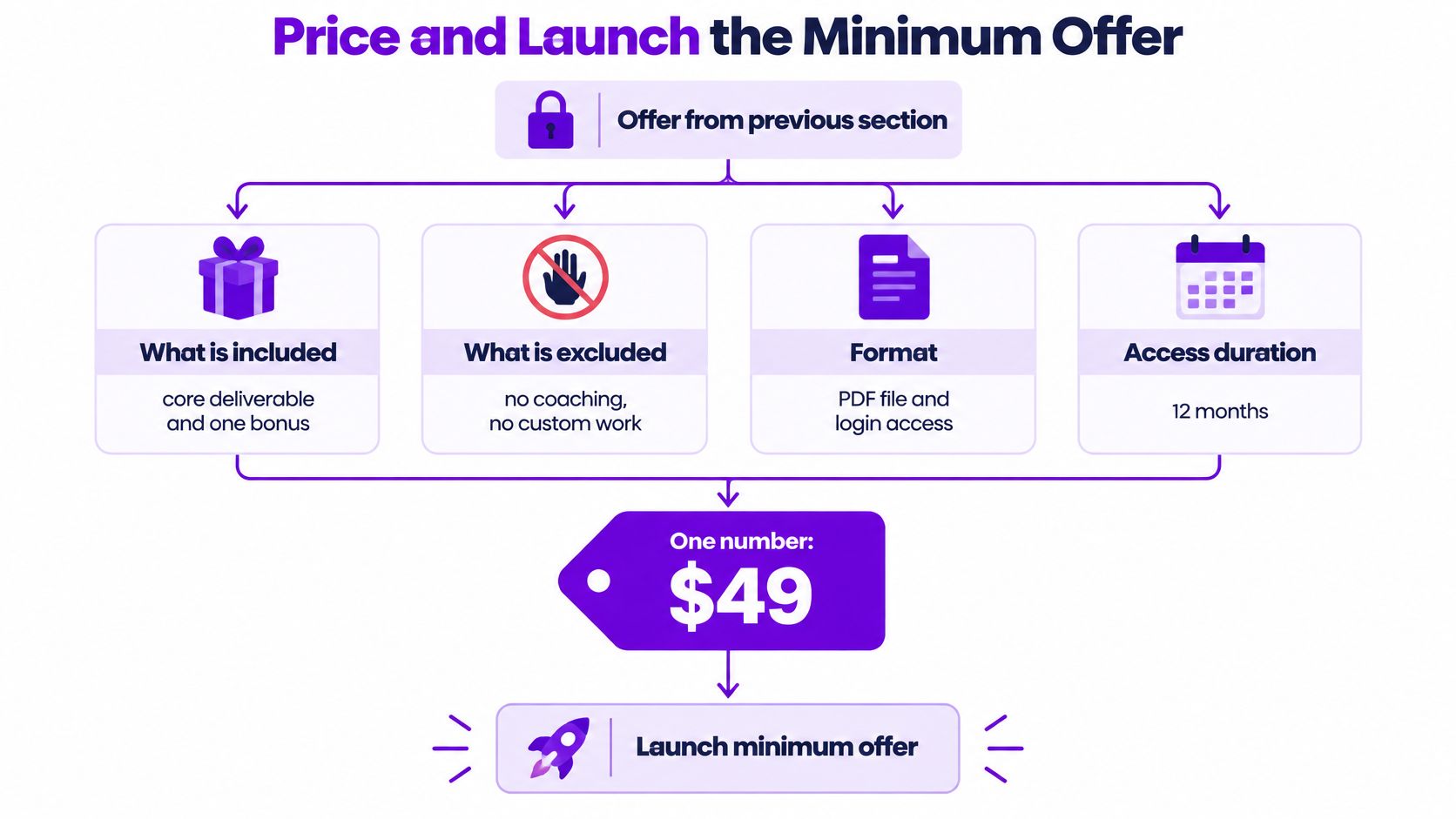
Write the offer boundary before choosing the final price:
Included: Editable intake form, welcome-email template, kickoff agenda, and a worked example.
Excluded: Personal coaching, contract review, and custom implementation.
Format: Clearly named editable files with a separate instruction document.
Access: State whether buyers download a fixed edition or receive continuing updates.
The illustration below shows a hypothetical offer configuration, not a recommended market price or access policy.
Choose a price you can support
Use your actual costs, not a generic fee estimate. Read the processor and storefront schedules for transaction charges, currency conversion, refunds, subscriptions, and payout costs. Then account for support time and any tax included in the advertised amount.
Subtract those costs from the selling price to see what remains before other business expenses. If buyers need individual setup help, either simplify the product or sell implementation separately. A low-priced file with unlimited personal assistance is a different business from a self-service download.
Publish a single primary purchase action. Show the deliverable in use rather than relying on a long feature list, and explain exactly what happens after payment.
Baymard's cart and checkout research reports that 22% of users have abandoned because checkout felt too complex, while the average checkout contains 11.3 form fields. Your minimum offer shouldn't require a complicated purchasing process.
Measure acquisition, sales, and use separately
Before launch, define events for landing-page view, lead capture, checkout start, purchase, refund, and first use. Attach source and campaign values so you can trace the buyer's path.
Acquisition conversion: Leads divided by visitors. This tests whether the free entry offer attracts the intended audience.
Sales conversion: Purchases divided by unique checkout starts. This helps identify purchasing friction.
Activation: Buyers reaching the first-use event divided by purchasers. For the onboarding pack, that might mean opening the editable template, not merely receiving an email.
Ship to the validation buyers first. Expand only when they can achieve the promised result without unplanned intervention.
Review buyers by channel and country on a regular schedule. Strong sales with weak activation call for delivery changes, not a bigger advertising budget. Treat failed downloads, repeated questions, and refund explanations as instructions for the next product revision.
Choose the Storefront and Fix Checkout Before Ads
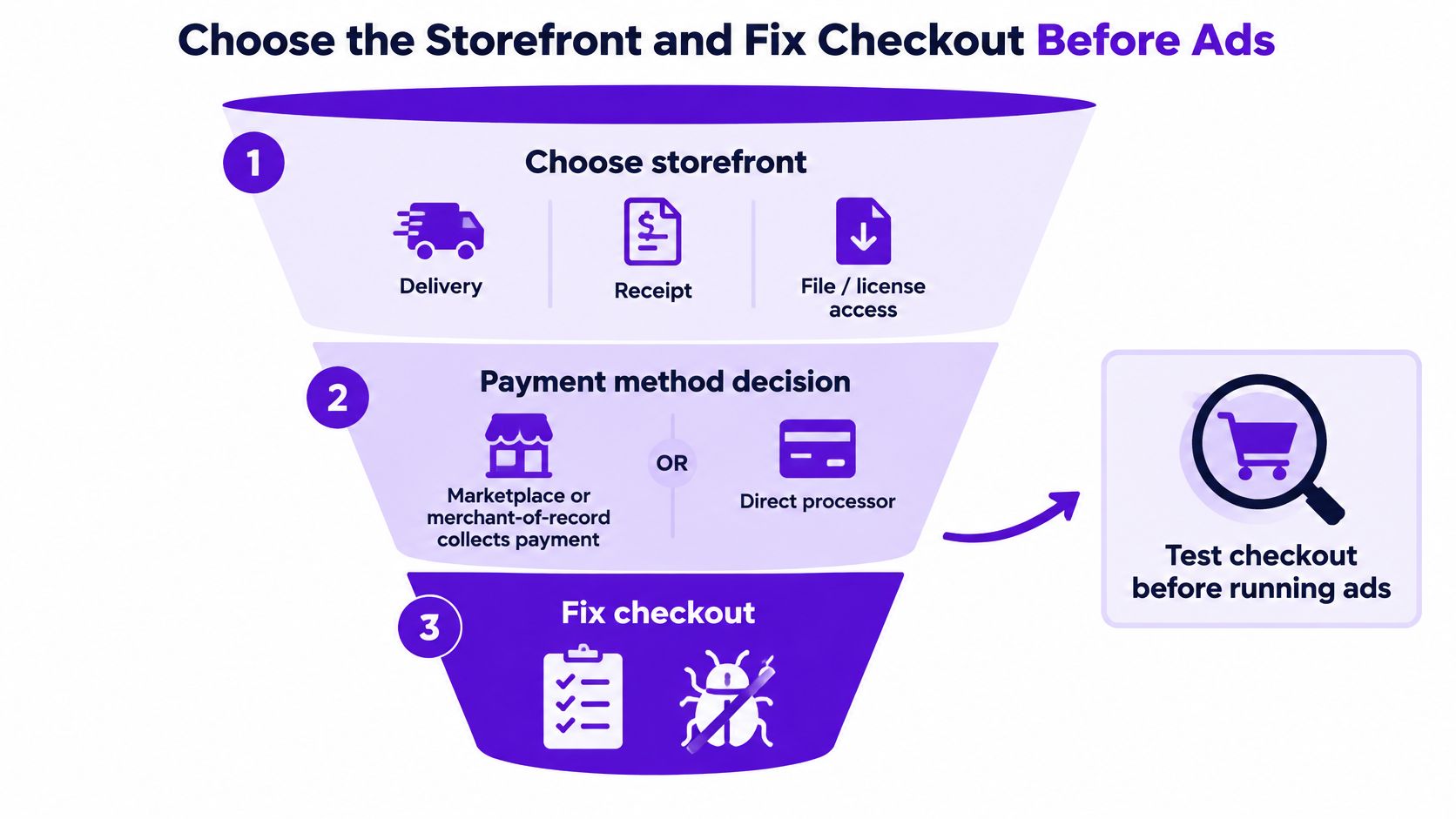
Choose the storefront by operational fit. It must handle delivery, receipts, and file or license access, but you also need to know who sells to the customer, who processes payment, and who retains the transaction records.
A marketplace, merchant-of-record service, and direct payment processor aren't interchangeable. Read the agreement rather than assuming that payment collection includes tax registration, remittance, or customer support.
Use this funnel as a purchasing-system check before spending on acquisition.
Compare what happens after a purchase
Check supported payout countries, settlement currencies, payment methods, access controls, and buyer-data export. Confirm that your business can keep receiving payouts when your travel location changes, subject to the provider's verification requirements.
Test the entire customer path on a phone. Buy the product through a permitted test transaction, inspect the receipt, open the delivery email, and follow the access instructions. Then verify that you can retrieve the corresponding order record.
LearnStream's discussion of avoiding hidden checkout fees is a useful companion when comparing how platforms present costs. Evaluate the buyer-facing total as well as the charges deducted from your payout.
Checkout losses and the fix to ship first
| Failure point | Benchmark | Change before scaling ads |
|---|---|---|
| Started carts that never order | Baymard's pooled analysis of 50 studies reports 70.22% average online cart abandonment | Divide purchases by unique checkout starts |
| Extra costs revealed late | Check abandonment after the total appears | Show currency, tax, and fees before payment |
| Card details feel unsafe | Review buyer questions and exit feedback | Use HTTPS, a recognizable processor, and a support contact |
| Payment or download fails | Track payment-failure and activation events | Offer a retry route and log failed downloads |
| Browsing mistaken for demand | Compare intent across traffic segments | Segment by country, device, source, and payment method |
The abandonment benchmark covers online commerce broadly. It isn't a target for your digital product, and a started cart doesn't always represent a buyer ready to pay.
Run the checkout-trust checklist
Reveal the total before submission. Make the charging currency explicit. Distinguish seller-imposed fees from conversion charges a buyer's bank may apply.
Make the seller identifiable. Display a working support address, recognizable payment methods, and concise purchase terms.
Remove unnecessary work. Enable guest checkout where possible. Don't demand shipping details for a download unless they're required for a legitimate payment or tax purpose.
Handle failure plainly. Give buyers a retry link and a useful error message, not another sales pitch.
Change a specific checkout element, then compare equivalent traffic segments. Don't attribute every improvement to your edit if the audience or campaign changed at the same time.
Own the Cross-Border Tax Work Platforms Leave Behind
The European Commission's report on the VAT e-commerce package records €38.8 billion in One Stop Shop VAT declarations in 2025, up 17% year over year. That shows the scale of cross-border commerce, not what an individual founder must register for.
Delivery can be automatic while tax administration isn't. Your residence, business location, and customer's country may all differ. A payment platform doesn't resolve those distinctions merely by accepting an international card.
Follow a tax-evidence checklist
Treat this as an operating checklist to review with a qualified adviser, not a universal tax ruling.
Record customer location. Preserve the relevant evidence your checkout collects, using privacy-conscious access and retention controls.
Identify the buyer type. Separate consumer purchases from business purchases. Validate a supplied tax ID rather than assuming that a company name establishes tax treatment.
Confirm platform responsibility. Establish whether the platform calculates tax, collects it, remits it, or does only part of that work.
Review the next jurisdiction before expanding. Ask which registration, threshold, filing, and product-classification rules apply to your circumstances.
Keep a joined-up order record. Tie the invoice, transaction currency, applied tax rate, payment, and subsequent refund to the same order identifier.
Who handles tax on a cross-border digital sale
| Case | Location evidence | Invoice need | Who often remits | Seller still keeps |
|---|---|---|---|---|
| B2C digital buyer in the EU | Customer-location evidence from checkout | Applicable receipt or invoice with tax treatment shown | Seller through an applicable scheme, or responsible platform | Order, rate, currency, refund |
| B2B buyer with a tax ID | Business identity, validated ID, and customer country | Invoice recording relevant buyer details and treatment | Confirm whether buyer accounting or seller collection applies | ID validation and invoice copy |
| Marketplace collects the tax | Evidence required under the platform's rules | Platform-issued transaction document where applicable | Platform where it has that responsibility | Proof of collection and transaction export |
| Seller collects directly | Seller's documented customer-location evidence | Seller-issued invoice under applicable rules | Seller after registration and filing review | Full calculation and filing backup |
Don't treat the table as permission to apply reverse charge or skip registration. Customer type, product classification, business establishment, and local rules can change the answer.
Our comparison of LLCs, corporations, and sole proprietorships can help frame the separate business-structure decision. An entity choice doesn't, by itself, settle the tax treatment of every international sale.
Retain accessible records even when a platform issues the receipt. Export them regularly and document who handles corrections when a buyer requests an invoice change or receives a refund.
Adding a customer country is an administrative decision as well as a marketing opportunity.
Prevent Refunds and Chargebacks After Payment
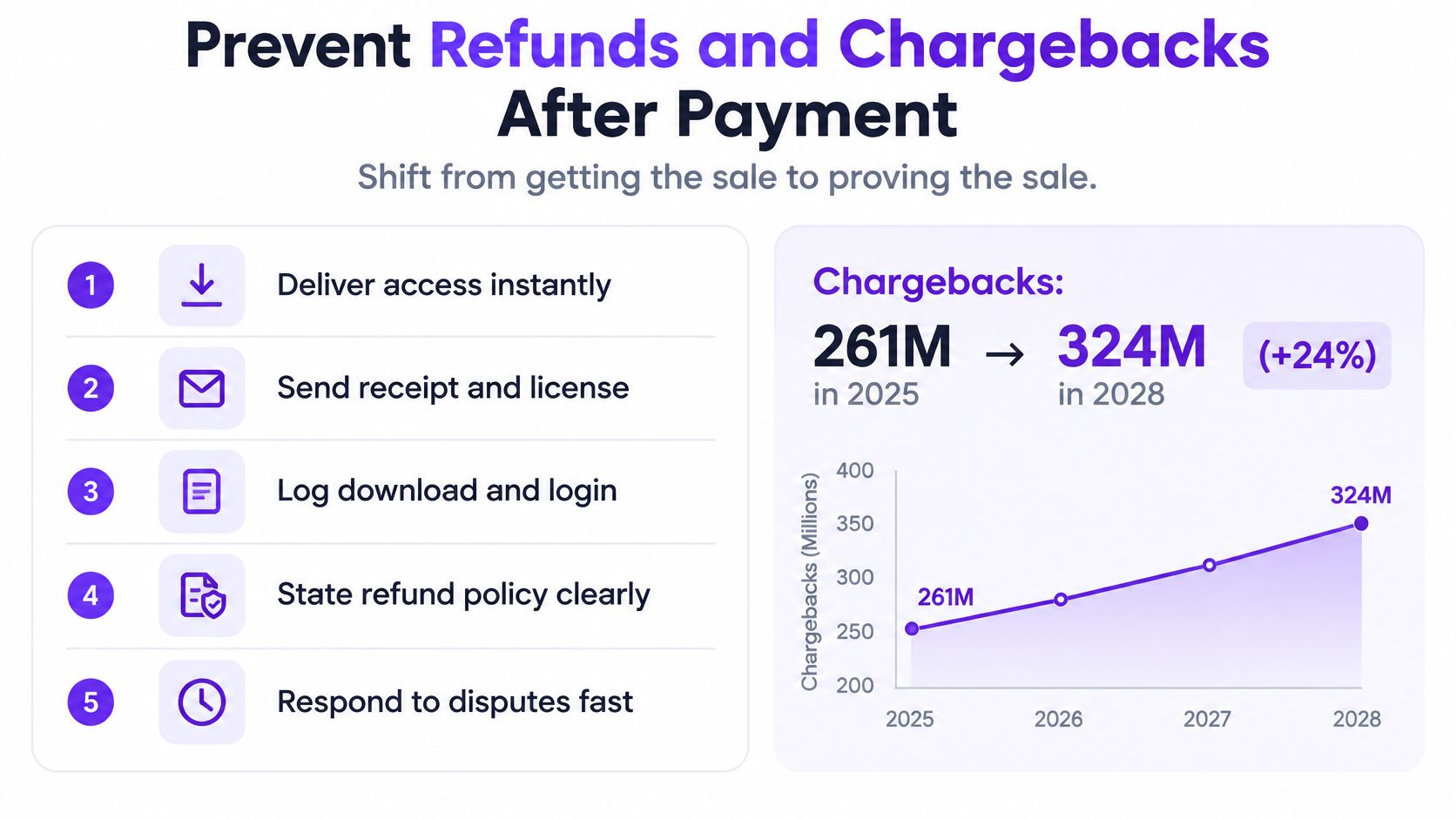
Shift from getting the sale to documenting the sale and fulfilling the promise. Mastercard's chargeback outlook projects global chargebacks rising from 261 million transactions in 2025 to 324 million in 2028, a 24% increase.
Those projections cover commerce broadly. For a digital seller, the practical issue is that you don't have a parcel-delivery scan, so your own access and support records matter.
The checklist below connects fulfillment with the evidence you'll need if a purchase is questioned.
Build the dispute trail
Preserve the offer buyers accepted. Keep the applicable product description, preview, license, and refund-policy version. For the onboarding pack, a sample should show the actual editing experience, not just a cover mockup.
Log delivery and access accurately. Record the order identifier, buyer email, delivery time, and file or license issued. Where available and appropriate, retain download or login events. An email sent isn't proof that a buyer opened the product.
Define support ownership. Set a response standard you can meet while traveling. Use a shared inbox or ticket system so a request doesn't disappear into a personal account. When access fails, investigate fulfillment before debating refund eligibility.
Explain usage rights. State whether consultants can adapt the pack for client work, share it within a team, or distribute the source files. Match account and seat controls to those permissions.
Resolve cancellation and refund requests consistently. Make subscription cancellation easy to locate. Record the request, decision, refund status, and customer communication together.
A refund policy should fit the product and applicable consumer rights. Don't assume that labeling a download nonrefundable overrides those rights, or that a partial credit is appropriate when a refund is due.
A clear promise and a fair resolution process are better operating choices than using a blanket no-refund rule to compensate for unclear scope.
Distinguish confusion from abuse
If you later offer a trial subscription, Portreeve's guide to reducing false chargebacks on free trials addresses an adjacent risk. Make trial terms, renewal conditions, and billing identification understandable before enrollment.
For an additional explainer, the video below provides another learning format.
When a dispute arrives, follow your processor's submission requirements and deadline. Provide relevant records rather than an indiscriminate export of customer information. Keep sensitive data restricted, and use recurring complaints to correct the product or its description.
Promote Through an Owned List First
Start building a permission-based list while validating, then promote the paid offer once buyers can complete the purchase and use it. An owned list gives you a direct contact channel, although you still depend on deliverability, consent, and the email provider's rules.
For the onboarding pack, a useful entry resource might be a client-intake gap checker. Someone who completes it has a reason to consider the paid templates; someone downloading a generic travel checklist doesn't necessarily have that need.
Use a tracked channel sequence
Capture relevant interest. Put a focused email signup beside the diagnostic resource. Explain what subscribers will receive and make unsubscribing straightforward. For destination or business-operations content, match the decision tool to the paid workflow rather than collecting unrelated addresses.
Email the tested offer. Use a campaign value such as
onboarding_launch_email. State the outcome and buying conditions plainly. Our email marketing best practices can help you organize consent, messaging, and follow-up.Recruit niche partners. Ask consultants, professional communities, or newsletter writers with a relevant audience for a direct recommendation. Give each partner a distinct campaign value and explain any referral arrangement transparently.
Publish useful problem-solving content. Demonstrate how to collect missing client information or prepare a kickoff agenda. Connect the explanation to the product only when the template is a logical next step.
Expand paid acquisition cautiously. Wait until you have a dependable view of purchasing and activation. Start with an identifiable audience and a spending limit you can afford, rather than buying broad traffic to diagnose an unfinished offer.
Rank sources by usable customers
Review campaigns by purchases, activation, support burden, and refunds. A partner who sends fewer buyers may still be a better fit if those buyers use the pack independently.
Track customer countries alongside campaign values, without inferring residence solely from a subscriber's current connection location. A partner recommendation may introduce a market you haven't prepared to serve.
Keep list exports secure and maintain relationships beyond a single social platform. If its reach changes, you should still have lawful ways to contact subscribers and collaborate with partners.
Put One Supportable Offer on Sale
Choose a product you can sell, deliver, explain, and support. A larger catalog won't fix an offer that requires you to chase every buyer through setup.
Use this suggested launch schedule as a working sequence, adjusting it to your product and obligations:
Week one, test commitment. Publish the scoped offer and recruit paid beta buyers or book substantive evaluation calls. Record objections and observe use before polishing the design.
Week two, publish the purchase path. Connect the sales page, checkout, and delivery system. Verify the events for product views, checkout starts, purchases, and first use.
Week three, review live operations. Inspect delivery records, buyer classification, customer countries, support requests, and refund handling. Resolve gaps before inviting a wider audience.
Make expansion conditional
Review failed downloads and refund reasons on a recurring day, and turn repeated problems into product edits. Keep an owner and a completion date for each fix so feedback doesn't become an unused spreadsheet.
The offer is ready to expand when strangers can pay, open the product, and understand the terms without a manual chase. Successful automation means routine orders don't require intervention, not that the business has no ongoing work.
Our Build section covers marketing, growth, and monetization for that next stage. We focus on helping readers grow their businesses and work smarter, not providing a blueprint for overnight success.
Visit Mazurly for practical marketing, growth, and monetization workflows that help you turn a validated digital product into a supportable online business. Explore our Build section and sign up by email for free entrepreneur insights, travel hacks, and remote-work strategies to support the business you're running across borders.